
✦ Free · No Sign-up · Unlimited Ideas
Free AI YouTube Thumbnail Maker
Describe your video topic and type a short title. Dreamixel creates a bold, high-contrast background and places your title on it — perfectly spelled and easy to read on small screens.
Examples made with this tool
Click “Use this prompt” to load an example into the generator.
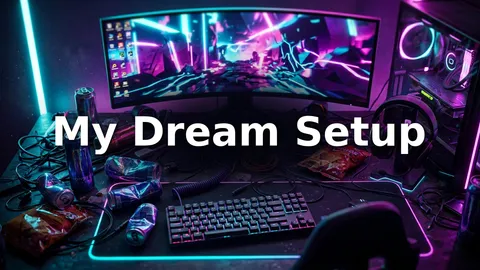
messy gaming desk with RGB lights and glowing monitor
Use this prompt →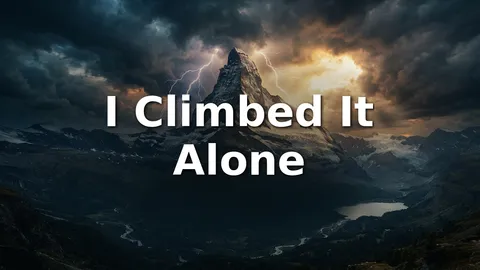
dramatic mountain summit with storm clouds, epic
Use this prompt →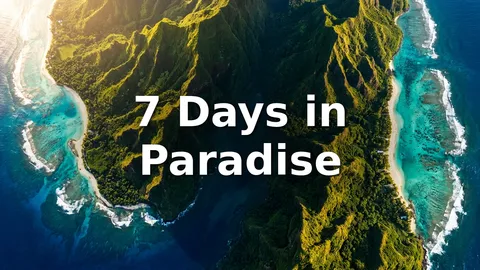
tropical island from above, travel vlog
Use this prompt →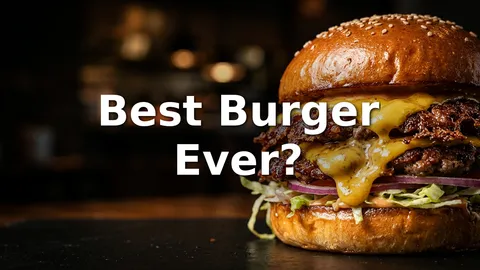
delicious burger close-up with melting cheese
Use this prompt →How to use the Free AI YouTube Thumbnail Maker
- 1
Describe the scene or topic of your video.
- 2
Type a short, punchy title (optional).
- 3
Generate, download and upload it as your custom thumbnail.
Prompt tips for better results
- Three to five words is the sweet spot for thumbnail titles.
- Ask for one big subject and high contrast — thumbnails are seen tiny on phones.
- Bright colors like yellow, red and cyan stand out in the feed.
Thumbnail specs
| Platform | Size | Ratio |
|---|---|---|
| YouTube video | 1280 × 720 px | 16:9 |
| YouTube Shorts cover | 1080 × 1920 px | 9:16 |
| Podcast / square | 3000 × 3000 px | 1:1 |
What you can make
YouTube videos
16:9 thumbnails for vlogs, tutorials, gaming and reviews.
Podcasts
Episode covers for video podcasts.
Courses
Lesson thumbnails with consistent titles.
Blog headers
Wide header images with a headline.
Frequently asked questions
What size is a YouTube thumbnail?▾
YouTube recommends 1280×720 pixels (16:9). Keep Landscape selected; the image can be resized to 1280×720 in any editor.
Can I make it without text?▾
Yes. Leave the title empty to get only the background.
Is it free?▾
Yes, free with no sign-up.
Do I need to sign up?▾
No. There is no account, no email and no credit card — open the page and start creating.
Can I use the images commercially?▾
Yes. You can use what you create for personal and commercial projects under our terms of service. Avoid prompts that copy trademarked characters or brands.
Why does it take about a minute?▾
Each image is generated fresh from your description at high resolution, which takes roughly 40–90 seconds. Keep the page open while it works.
More free AI tools
Pick what you want to make — the AI handles the rest.
Free AI Coloring Page Generator
Printable black & white coloring pages
Alphabet & Number Coloring Pages
ABC and 123 learning coloring sheets
AI Children's Book Illustration Generator
Warm illustrations for kids' stories
AI Picture Flashcard Maker
Picture + word learning cards
Free AI Wallpaper Generator
Phone & desktop wallpapers
Free AI Sticker Generator
Cute die-cut sticker designs
Free AI Avatar Generator
Profile pictures in any style
Free AI Logo Generator
Simple brand logo ideas
Free AI Banner Generator
YouTube, social & web banners
Free AI Album Cover Generator
Cover art for songs, EPs & podcasts
Free AI Book Cover Generator
Novel, ebook & KDP cover art
Free AI Fantasy Character Generator
RPG & D&D character portraits
Free AI Fantasy Map Generator
World, kingdom & dungeon maps
Free AI Anime Generator
Anime characters & scenes
Free AI T-Shirt Design Generator
Print-on-demand graphics
Free AI Name Art Generator
Name posters & name wallpapers
Free AI Quote Image Maker
Quotes on beautiful backgrounds
Free AI Classroom Poster Maker
Door signs, welcome & rules posters
Free AI Greeting Card Maker
Birthday, thank-you & congrats cards
Free AI Invitation Maker
Party & baby shower invitations
Free Ramadan & Eid Card Maker
Ramadan Mubarak & Eid Mubarak cards